Test DPC
- 4.1
- Rating
- 500.00K
- Installs
- Free
- Price

 Analysis by App-foxy
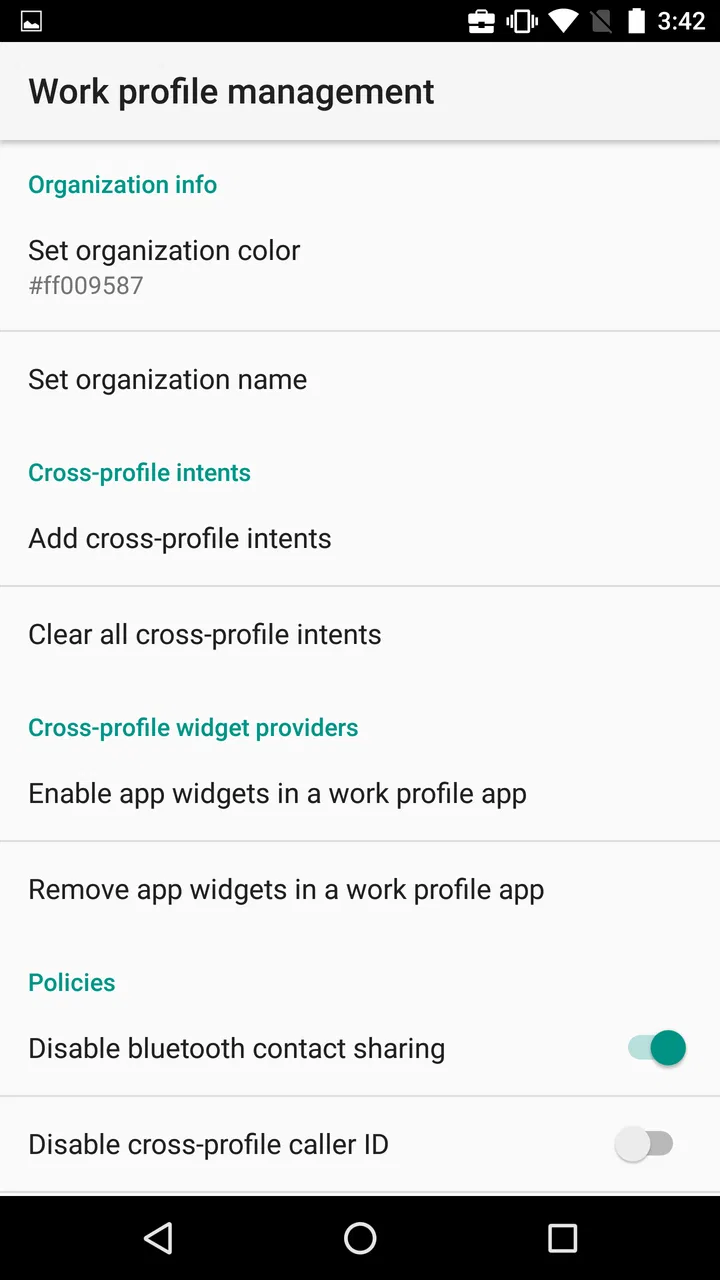
When I first opened Test DPC, I quickly understood that it was not another household organizer, parental-control tool, or device-customization app. It is a technical sample application from Google LLC, built around Android Enterprise device-policy management. That distinction matters, especially if you are considering it for a shared phone or tablet at home. It can help someone study how managed Android environments behave, but it is not designed to make family device sharing simple.
My overall impression is that this is a useful specialist tool with a very narrow audience. It gives developers, testers, and technically curious Android users a way to work with policy-controller behavior on a compatible device. For an ordinary family trying to separate accounts, coordinate screen time, or keep children’s activities organized, it is the wrong starting point. The app is free, rated for Everyone, and belongs to the Libraries & Demo section, but those friendly store details should not be mistaken for a promise of an easy everyday experience.
What happens when a household shares one Android device?
Imagine a family keeping one Android tablet in the kitchen. One person uses it for recipes, another checks school material, and a child occasionally watches educational content. The natural question is whether this app can turn that tablet into a neatly managed shared device. In my experience, that expectation creates confusion. Test DPC is not a polished family dashboard where you add household members and choose simple rules from a friendly menu.
You May Also Like

 Blood Strike: 2.5 Anniversary
Blood Strike’s Loadouts Turn Every Drop Into a Tactical Gamble
A close look at Blood Strike’s custom loadouts: how fast access to signature weapons reshapes its battle royale rhythm, rewards preparation, and narrows the gap between fights.

 Pandora - Music & Podcasts
Pandora’s Music Is Easy to Start, but Harder to Recover
Pandora’s strength is its low-effort path from a seed to a station. Its weak spot is how much confidence it asks you to place in connection, setup, and quiet recovery.

 8 Ball Pool
 Is Built on Rivalries, Rematches, and Routine
A close look at the rivalries, rematches, shared routines, and unanswered safety questions that turn a quick pool match into a persistent mobile community.

 Samsung Music
’s Quiet Strength Is Playing What You Already Own
Its reach comes less from spectacle than from dependable access to a personal library. That simplicity is both the app’s strongest retention engine and its ceiling.

 AccuWeather: Weather Radar
AccuWeather Review: A Quick, Clear Forecast for Everyday Decisions
For everyday plans, the best forecast is the one you can understand quickly. AccuWeather makes rain timing, radar, and local conditions easy to act on, with a few trade-offs.

 Hill Climb Racing
Why Hill Climb Racing Still Turns Crashes Into One More Run
A tiny car, a bumpy hill and one more upgrade: Hill Climb Racing keeps resurfacing because its simple chaos makes every near-miss feel personal.
More From Our News Desk



Instead, it acts as a sample device policy controller. Its purpose is to demonstrate and exercise management behavior associated with Android Enterprise. That makes it relevant when the person handling the tablet is testing an enterprise-style setup, examining how Android responds to administrative policies, or developing an application that needs to work with managed devices.
For a shared household device, the important boundary is responsibility. The app does not replace the operating system’s normal account tools, and it should not be treated as a complete solution for switching between adults and children. If your goal is simply to let two people use one tablet without mixing personal information, Android’s built-in user or guest features may be more appropriate when the device supports them. If you want family supervision, a dedicated parental-control product is usually easier to understand and maintain.
Where this app becomes interesting is in controlled testing. A developer can use it to explore how an Android Enterprise environment behaves before building or validating a management workflow. That is a very different task from sharing a device casually. The same controls that are useful in a test environment can be confusing or disruptive when applied to a tablet that several people depend on every day.
Why the setup boundary matters
The first practical lesson is to decide whether you are testing a device-management scenario or merely trying to organize household use. A device policy controller sits close to the management layer of Android. It is therefore not something I would install casually on the only phone in the home, especially if nobody is prepared to understand the consequences of changing device-management settings.
Before using it, I would choose a spare, resettable device or a dedicated test environment. That is not because the app is inherently suspicious; it is because policy experiments can affect the way a device is configured. A spare device gives you room to learn without risking personal photos, work accounts, school files, or the daily communication tools everyone needs.
There is also a difference between installing an app and assigning it a management role. A normal app can usually be opened, inspected, and removed like any other application. A policy controller is meaningful because Android recognizes it as part of an administrative arrangement. Anyone experimenting with it should read each system prompt carefully and avoid accepting a management configuration simply to see what happens.
The safest workflow is to separate testing from real household use. Keep the family tablet in its normal configuration, and use another compatible device for policy experiments. If you need to return to a clean state, make sure important data is backed up first and that you understand which account credentials will be needed afterward. This habit is more valuable than any individual setting inside the app.
The minimum operating-system requirement is Android 5.0, which gives the app a broad technical reach across older Android hardware. That does not mean every device will present the same management behavior. Android manufacturers, system versions, and device capabilities can influence what is available or how a policy is applied. I would therefore treat compatibility as something to test on the exact hardware involved, not as a guarantee that every menu will behave identically.
Using it for coordination rather than control
In a household, coordination usually means agreeing on who uses a device, when it is available, and which information should remain private. Test DPC does not turn those social arrangements into a family calendar or a shared booking system. It can be part of a technical demonstration of managed-device behavior, but it does not remove the need for clear communication among the people using the device.
For example, suppose a parent asks a developer in the family to prepare a tablet for occasional school use. The developer might use a test device to understand policy behavior, then configure the real tablet with ordinary Android tools that everyone can recognize. That division is sensible: the technical work happens away from the family’s daily device, while the final household setup remains understandable to the people who will actually use it.
This separation also helps with troubleshooting. If an application stops behaving normally after a policy experiment, you can identify the test device as the source of the problem instead of wondering whether a child, guest, or visiting relative changed a setting. In shared homes, clarity about who changed what is often more useful than having a powerful control that nobody can explain.
I also like the app as a coordination aid between developers and testers. One person can prepare a reproducible management scenario, while another checks how an application responds under that scenario. That is a legitimate shared-device workflow, but it belongs to a lab, classroom, or development process rather than a typical family routine.
The app’s status as a sample controller is the key to understanding its interface. You may encounter technical terminology or options that make sense to someone familiar with Android Enterprise but feel opaque to a parent who only wants separate spaces for different users. If you cannot explain a setting in plain language before enabling it, I would leave it alone and look for a simpler tool.
Age, trust, and the difference between a sample and a safeguard
The Everyone content rating can make Test DPC look suitable for any household member. I would interpret that rating narrowly: it does not suggest that the app contains mature material. It also does not mean that a child should be the person responsible for configuring it. The important issue here is technical authority, not age-appropriate entertainment.
A child may use a device that has been prepared through a managed setup, but that is different from handing the child the policy-controller application. Adults or trained administrators should understand the configuration and keep the experimental work separate from normal use. Trust in this context means knowing who is allowed to change device behavior and making that boundary visible to everyone.
This is especially important on a shared tablet. If a child believes the app is a normal utility, they may open it out of curiosity. If an adult assumes it is a complete supervision system, they may rely on it for protections it was never intended to provide. Neither assumption is helpful. I would explain that the app is a technical demonstration tool and keep it out of the everyday app area if the device is used by people who do not need it.
For families seeking age-based restrictions, content filtering, activity reports, or straightforward approval flows, a purpose-built family-management solution is a better match. Test DPC should not be selected because it sounds official or because it comes from Google LLC. Its value comes from the specific Android Enterprise testing role it serves, not from replacing consumer-focused safety tools.
There is a useful trust lesson here for mixed-age households: privacy boundaries and administrative boundaries are not the same thing. Separate user profiles may help keep one person’s files apart from another’s, while a policy controller concerns how the device is managed. Combining those ideas without understanding them can produce a setup that feels restrictive to adults and still fails to provide the protections a child needs.
What I found useful during technical testing
The strongest reason to use this app is that it provides a concrete way to investigate device-policy behavior without building a controller from scratch. A developer working on Android Enterprise integration can use a sample controller as a reference point while checking how a managed device responds. That can make abstract documentation easier to connect with actual system behavior.
A second useful scenario is classroom or workshop demonstration. An instructor can show the difference between a regular application and a device-management component on a dedicated test handset. Students can observe why enterprise management is more sensitive than ordinary app permissions, and they can learn to reset and document a device between exercises.
A third insight is that repeatability matters more than experimentation for its own sake. I would keep notes about the device model, Android release, account state, and each change made during a test. If the same policy produces a different result later, those notes help identify whether the cause was the operating system, the hardware, or the order of configuration. This is a practical habit that a basic app description would not tell you.
Another worthwhile workflow is to compare a clean device with a managed test device. Install the same ordinary application on both, perform the same basic task, and record where the user experience differs. This can reveal whether a problem belongs to the application under development or to the management context surrounding it. The comparison is much more informative than testing only on a device whose state has already been changed several times.
Finally, I would avoid treating the app as a permanent household administrator. A sample controller is most valuable when the test has a defined purpose and an exit plan. Decide what you are trying to learn, make one change at a time, and return the test hardware to a known state afterward. That discipline prevents a shared device from becoming an accidental experiment.
Version, availability, and everyday expectations
The current version is 9.0.13, and the app has been available since October 22, 2015. Its longevity and broad Android requirement help explain why it appears in the Libraries & Demo category rather than among ordinary family utilities. It is free to install, which makes it accessible for learning and testing, but free access does not remove the need for technical judgment.
The app has an average rating of 4.1 from around 1,500 ratings, with 38 written reviews, and it has passed 500,000 installs. Those figures suggest a real audience, but they should be read in context. A rating for a specialist sample tool reflects a mixture of developers, testers, students, and curious users. It does not tell me that the app is convenient for a parent setting up a shared tablet.
On a supported device running Android 5.0 or later, the basic availability question is straightforward. The more important question is whether your device-management goal matches the app’s role. If you are evaluating Android Enterprise behavior, the answer may be yes. If you are looking for a polished interface for household rules, the answer is probably no, even if installation itself is easy.
I would also resist judging it by the standards used for consumer apps. A sample controller does not need colorful onboarding, family profiles, or a friendly explanation for every technical option. Those omissions would be weaknesses in a parental-control product, but they are less surprising in a demonstration tool. The real test is whether it helps you understand or reproduce the management scenario you are working on.
When another option makes more sense
For simple account separation, start with Android’s own multi-user or guest functions when your particular device offers them. They are closer to the problem of letting different people use one device without sharing the same personal space. They also fit the mental model of a household better than a policy-controller sample.
For child safety, choose a dedicated parental-control service that clearly explains supervision, content restrictions, and family administration. Such a tool is designed around the parent-child relationship, whereas Test DPC is designed around enterprise management testing. The distinction is not cosmetic; it affects how settings are presented and what kind of support the user can reasonably expect.
For a company-owned phone fleet or a professional deployment, a full enterprise mobility platform may be more suitable. Test DPC can help during development or demonstrations, but it is not a substitute for the operational processes needed to enroll, support, monitor, and recover a real fleet. A business should not mistake a sample component for a complete management service.
For developers, however, the comparison changes. A generic profile-switching tool will not answer questions about device-policy behavior, and a parental-control app will not provide the same technical context. In that narrower situation, this app can be more relevant than a polished consumer alternative precisely because it exposes a management-oriented environment.
My household verdict
I would recommend Test DPC to an Android developer, tester, instructor, or advanced user who has a clear Android Enterprise experiment and a spare device available. It is also a sensible learning aid when the goal is to understand how a device policy controller fits into Android management. The free price lowers the barrier to trying it, and the long-standing availability makes it easy to consider for a controlled test workflow.
I would not recommend it as the main solution for a shared family phone or tablet. It does not replace separate user accounts, a family schedule, a child-safety product, or the conversations that make shared-device use work. Installing it on the household’s only device without a backup plan is an avoidable risk, especially when the person configuring it is not comfortable with Android’s administrative concepts.
My practical advice is simple: define the experiment, use dedicated hardware, document every change, and keep the final family setup separate from the test environment. That approach lets the app do what it is good at without forcing children, guests, or less technical adults to live inside a configuration they do not understand.
In the end, this is a focused technical instrument, not a household convenience app. If you need to investigate managed Android behavior, it can be genuinely useful. If you need calm, transparent coordination among family members, choose tools built for that purpose and leave this sample controller in the lab.
FAQs for Test DPC
01What is Test DPC and who is it intended for?
Test DPC (Device Policy Controller) is an Android application designed primarily for developers. It allows them to test their apps in a managed profile or device owner environment, simulating corporate and educational settings. This helps developers ensure their apps function correctly with enterprise-level management features.
02How do I set up and use Test DPC on my device?
To set up Test DPC, you need to enroll your device as an administrator or create a managed profile. After installation, the app guides you through the setup process. Ensure your device supports Android for Work features, as Test DPC relies on them for proper functionality. Detailed instructions are also available within the app.
03Is Test DPC safe to use on my personal device?
Test DPC is a safe tool for its intended purpose of app testing. However, it is primarily meant for developer use and might alter device settings or policies. Users should be cautious and ideally use a test device to avoid unintended changes to personal data or settings.
04What permissions does Test DPC require, and why?
Test DPC requires extensive permissions to simulate a managed environment accurately. These include access to device settings, app installation, and network configurations. These permissions are necessary to provide a comprehensive testing environment that mimics real-world enterprise scenarios.
05Can Test DPC be used on all Android devices?
While Test DPC is compatible with many Android devices, it is best used on devices running Android 5.0 (Lollipop) and above, as these versions support Android for Work features. Some older devices may not fully support all functionalities, so it's advisable to check device compatibility before installation.
Pros
- Highly customizable for testing purposes.
- Supports multiple user profiles.
- Simulates various device configurations.
- Easy to install and use.
- Open-source with community support.
Cons
- Requires technical knowledge to use.
- Limited to Android devices only.
- Not suitable for casual users.
- No direct customer support.
- Occasional bugs and glitches.

Test DPC
Gallery